
What's new — March 2026
This content is not available in your language yet.
#1 Reusable note templates
Section titled “#1 Reusable note templates”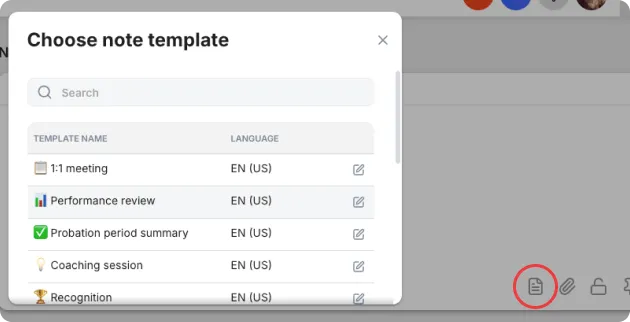
Create a template once, reuse it forever. Annual reviews, one-on-ones, onboarding checklists — the structure is already there when you start a new note.
Why: Teams writing recurring notes were recreating the same structure from scratch every time. Templates eliminate that repetition and keep your notes consistent across the firm.
How: Go to Settings → Clients / Workforce → Note Templates to create your first one. When writing a note, pick a template from the dropdown to start.
Read the full guide to Note Templates →
#2 Control who sees each note
Section titled “#2 Control who sees each note”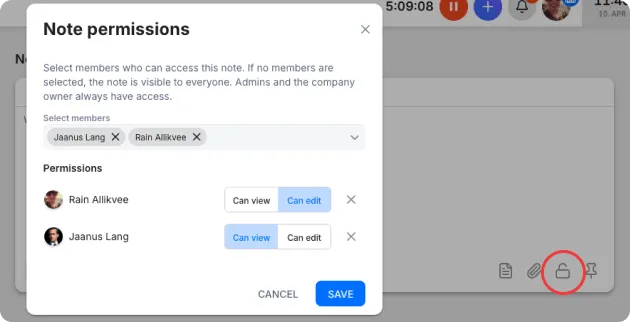
Notes now support per-note access control. Restrict who can view or edit a note — useful for HR reviews, salary discussions, or anything that shouldn’t be visible to the whole team.
Why: Previously, any team member with access to a client, project, or supplier could delete or edit all notes. Permissions make it safe to keep confidential content in Uku without risk of accidental changes.
Try it: Open any note → click the lock icon → pick who can see it.
#3 Find any note in seconds
Section titled “#3 Find any note in seconds”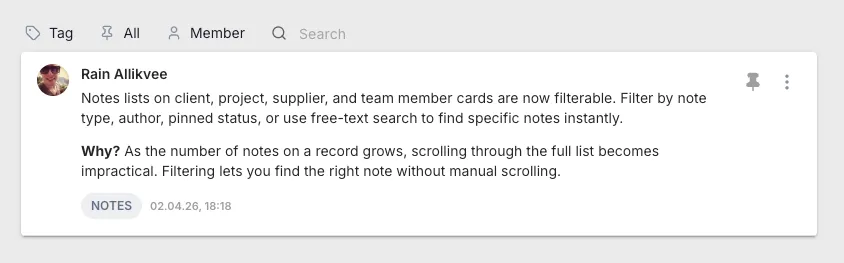
Note lists on client, project, supplier, and member cards are now filterable. Filter by type, author, pinned status, or use free-text search.
Why: Once a record has dozens of notes, scrolling isn’t practical. Filters turn your note history into something you can actually query.
#4 Turn a note into a task in one click
Section titled “#4 Turn a note into a task in one click”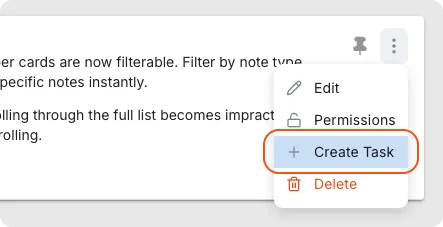
Write a note, spot an action item, click once — the task is created and the note attached for context. No more copy-paste or “remind me to follow up on this.”
Why: Notes are where follow-ups live. Turning them into trackable work used to mean remembering to create a task and manually linking context. Now it’s one action.
Improvements
Section titled “Improvements”Billing
Section titled “Billing”- Bulk invoice creation now works reliably — all invoices generate in one go, every time.
- Invoices display the translated product name when a translation exists.
- Hourly product topic selection is now visible even for client-customized products.
- Invoice PDFs support new row-grouping options — merge rows by description or article code, with quantity or total display mode.
- New filter options: “Not sent” and “Not exported” invoice list filters to surface invoices pending client delivery or accounting export.
- Non-admin users can now be given bulk-action permissions.
- Selecting a template suggestion copies over description, bill-at, and bill-by fields.
- Finishing a task on the dashboard shows the next task instantly — no page reload.
- Full filenames are now visible on hover.
Reports
Section titled “Reports”- Task start date is now included in exports.
Calendar
Section titled “Calendar”- When filtering by specific team members, only their vacations are shown; group selections expand to display individual member vacations.
Monitoring
Section titled “Monitoring”- Targets can be set per period.
Client Portal
Section titled “Client Portal”- Your firm’s client app stays visible in the App Store even when the account is paused or the trial has ended.
- Stability improvements for Outlook and Gmail connections.
Got feedback on any of these? Reply to this email or write us at uku@getuku.com — every change above started as a user conversation.